Is Apple HomeView Private and Secure?
A practical guide to setup, accessory compatibility, Siri AI, cameras, personalization, and privacy.
Direct Answer
A shared smart-home display can bring together camera feeds, personal information, connected devices, and household controls. That convenience also makes access management important. An Apple HomeView smart home should be configured so that each household member has appropriate access without exposing more personal information than necessary.

Key Takeaways
- Review household accounts and remove access that is no longer needed.
- Check which devices can provide personal context.
- Manage camera recognition, recording, and notifications separately.
- Protect connected locks and other sensitive accessories with appropriate permissions.
- Revisit privacy settings whenever household devices or members change.
Identify What Your Smart Home Can Reveal
Before adjusting permissions, consider the information available through HomeView and its connected accessories.
A shared display may bring together:
- Camera feeds and notifications.
- Lock and accessory status.
- Household schedules and reminders.
- Personal messages and other app information.
- Location-related context from supported devices.
Not every household member needs access to every category. Separate personal information from shared household controls wherever the available settings allow it.
Review Household Members and Device Access
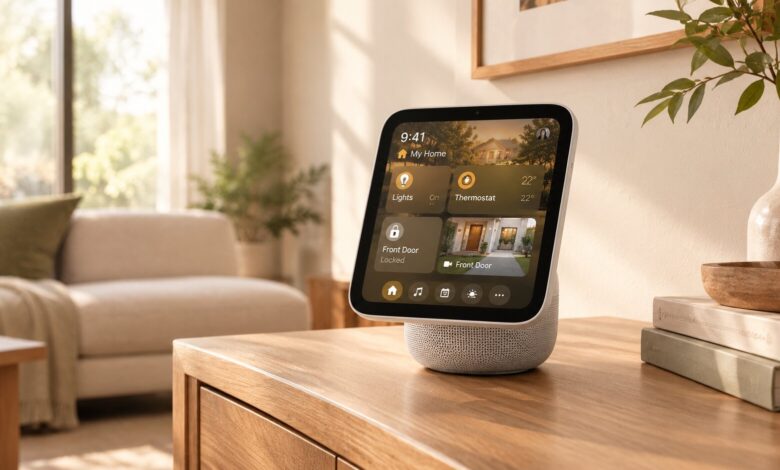
HomeView can recognize up to six people and provide personalized home screens. This makes it important to check which household members and registered devices remain authorized.
Personal-context requests may require a registered Apple Intelligence-enabled iPhone or iPad on the same home Wi-Fi network, recently unlocked and running supported software and languages.
Review the household list when someone moves out or a device is replaced. Remove former residents and unused accounts rather than allowing old access to remain indefinitely.
Protect Connected Cameras and Security Devices
The Home Camera face can display up to nine compatible video feeds simultaneously. With compatible cameras and a supported iCloud+ subscription, certain features may enable encrypted recognition of people, familiar faces, pets, packages, and vehicles.
Camera access deserves its own review. Check:
- Which cameras are connected and who can view them.
- Whether recording and recognition features are enabled.
- Which events generate notifications.
- Which subscription and compatibility requirements apply.
- Whether camera access is still appropriate for every household member.
Apply similar care to connected locks. Decide who can control them and avoid giving broad access when a more limited permission is sufficient.
Understand Apple’s Privacy Protections
Apple says Siri requests can be processed on the device or through Private Cloud Compute, where request data is not stored or made accessible to Apple or others. Some compatible camera-recognition features are described as end-to-end encrypted.
These protections are important, but they do not eliminate every privacy risk. Connected accessories, household accounts, network settings, and third-party services also affect the overall security of a smart home.
Review the settings of individual products instead of assuming that every device follows the same privacy model.
Secure the Connected Accessories
HomeView supports compatible Apple Home and Matter accessories, which may include lights, thermostats, locks, blinds, cameras, and sensors. Compatibility alone does not guarantee that an accessory is configured securely.
Use these maintenance practices:
- Keep account credentials unique and protected.
- Install available software updates for connected accessories and bridges.
- Remove devices that are no longer used.
- Check which household accounts can operate sensitive accessories.
- Review permissions after adding a new camera, lock, or other connected product.
A device with Wi-Fi or its own manufacturer app is not automatically compatible with HomeView, so verify support before adding new equipment.
Keep Personal Information Separate
Apple HomeView smart home offers different display faces and widgets for household use. Photos can show images from a selected shared album, while Flow provides interactive artwork and Snoopy displays animations related to time, weather, and occasions.
Home Modular can surface favorite accessories, and widgets can display information from apps such as Calendar, Messages, and Reminders.
Personalized screens help different people access their own information. Still, review what is shared and who can access it, especially when the display is located in a common area.
For the official feature list, compatibility details, and availability information, see Apple’s HomeView announcement in the Apple Newsroom.
Frequently Asked Questions
How many people can use Apple HomeView?
HomeView can recognize up to six people and provide personalized home screens. Some personal-context features require a compatible registered iPhone or iPad.
Can HomeView display several security cameras?
Yes. The Home Camera face can display up to nine compatible video feeds at once.
Does Apple HomeView support third-party accessories?
Yes, when the exact products support Apple Home or Matter. Some devices may also require a compatible bridge.
Does Siri AI protect personal information?
Apple says Siri requests can be processed on the device or through Private Cloud Compute. Review Apple’s privacy information alongside the settings of connected third-party devices.
When is Apple HomeView expected to be available?
Apple announced HomeView in October 2026, with availability scheduled to begin November 13. Regional availability may vary.
Make Privacy Reviews Part of Household Maintenance
A one-time setup is not enough when people, accounts, and connected devices change. Revisit access after a household member moves, a camera is added, or a smart lock is replaced.
Check account access, personal-context devices, camera notifications, and accessory permissions periodically. This helps keep the Apple HomeView smart home useful without allowing outdated access to accumulate.
The Bottom Line
Apple HomeView brings personal information and connected-home controls into a shared space. Its privacy protections are useful, but responsible configuration still matters. Review household access, secure cameras and locks, maintain connected devices, and make permission checks a regular part of smart-home maintenance.
Also worth checking out:
- How to Use 3D Graphs in Apple Math Notes and Organize Your Notes
- How to Use Apple’s Live Rewind Audio Intelligence?
- How Do You Smoothly Switch to a New iPhone 18?
- Related reading on techieclouds.com: Practical ideas for smarter home devices; Cybersecurity risks created by IoT devices.